


Microsoft Modern Work
Applications, collaboration, shared information and device management.
Explore Microsoft Modern WorkTechnology
Subnet plans, migrates and manages Microsoft 365 and Azure for South Australian organisations: licensing, identity and devices, collaboration, cloud infrastructure and getting ready for Copilot.

Since 2001
a Microsoft partner
275+
Microsoft licensing agreements and projects
55+
SharePoint builds and migrations
45+
Azure projects
25+
Copilot and AI readiness engagements
WORK WITH SUBNET
Active Directory often carries years of changes to accounts, groups, permissions and configuration. A focused review can help identify where that history has created uncertainty, operational issues or unnecessary access.
Subnet can discuss an assessment of the agreed directory environment and help turn the findings into a prioritised remediation plan. Changes should take account of application dependencies, service accounts and recovery arrangements, with approval and verification built into the work.
Active Directory Domain Services is distinct from cloud-only Microsoft Entra ID. The assessment scope and any remediation must be agreed for your environment.
WORK WITH SUBNET
Endpoint management connects devices, applications and policy. Subnet can scope Intune implementation work around the devices and operating requirements in your environment, with enrolment, configuration, deployment and handover agreed before delivery.
Confirm the required licensing and supported platforms. An Intune project does not automatically include every add-on or replace all existing device-management responsibilities.
WORK WITH SUBNET
Subnet helps with Microsoft licensing, deployment, configuration, security, governance and support. Start with a particular need, such as moving email, organising shared files, managing devices, strengthening security or reviewing cloud infrastructure. We connect the required products to a defined project and an agreed operating model.
WORK WITH SUBNET
Word, Excel, PowerPoint and Outlook support familiar work across documents, spreadsheets, presentations, email and calendars. Exchange Online provides hosted business email. Teams brings meetings, chat and collaboration together, while SharePoint and OneDrive support different ways of storing and sharing work.
The right starting point is how your people work, which applications they need and how those applications will be deployed and supported. Subnet can help align licensing, configuration and migration with those needs. Desktop application rights, Teams availability and additional services depend on the selected subscription.
WORK WITH SUBNET
A file migration should make information easier to use without recreating years of unclear ownership. SharePoint can provide shared sites and document libraries; OneDrive supports an individual's working files and sharing; Teams connects conversations with the information a team uses.
Subnet's project approach can cover discovery, site and library design, permissions, migration mapping, pilot testing, cutover and user handover. Agree who owns each workspace, who can share externally and how access is maintained as people join, move and leave. Teams and SharePoint permissions need to be designed together.
WORK WITH SUBNET
Microsoft Entra ID manages cloud identity and access. Microsoft Intune manages supported devices and applications. They serve different purposes but can work together, for example when access decisions depend on an approved device's compliance state.
Subnet can scope identity and endpoint work around your existing environment: authentication, sign-in experience, device enrolment, application deployment, configuration and pilot rollout. Existing Active Directory dependencies, shared devices and responsibility for physical deployment should be resolved before change begins.
WORK WITH SUBNET
Microsoft security work should address the controls already available, the gaps that matter and the people responsible for operating them. Tenant configuration, identity controls, endpoint protection and email security require related but distinct decisions.
Microsoft Defender for Business and Defender for Endpoint protect endpoints; Defender for Office 365 focuses on email and collaboration threats. Subnet can scope hardening and licensed security-feature enablement, including validation and handover. Product selection and ongoing monitoring responsibilities are agreed separately.
WORK WITH SUBNET
Access permissions answer who can reach information. Purview adds capabilities for classifying and protecting sensitive content, applying data-loss-prevention policies and managing retention. These controls have different purposes and should follow your information-handling requirements.
Subnet can help you assess information protection and governance needs alongside Microsoft 365 and AI readiness. Agree the data, users, workloads, policy owners and licences before selecting an implementation scope. Labels, DLP and retention do not remove the need to correct inappropriate sharing or maintain permissions.
WORK WITH SUBNET
Azure can support virtual infrastructure, application workloads, virtual desktops and recovery designs. A move to Azure should start with workload requirements, connectivity, identity, performance and operating cost, rather than an assumption that every system belongs in the cloud.
Subnet can help assess cloud options and scope the foundations, selected workload changes and testing. Azure Virtual Desktop projects also need application, image, profile and user-experience decisions. Recovery work has its own protected workloads, test scope and operating responsibilities.
CUSTOMER EXPERIENCE
Blackwood High School’s published story describes a Microsoft Hyper-V migration and infrastructure consulting. Explore the customer’s account of the project and advice behind it.
Read Blackwood High School’s storyThis is historical Hyper-V project evidence, not proof of Azure or Azure Virtual Desktop delivery. It does not establish a current service agreement.
WORK WITH SUBNET
A subscription, an implementation project and an ongoing support agreement cover different things. We define the proposed changes, prerequisites, user impact and acceptance checks, then agree who owns administration, support and security operations after handover.
CONNECTED EXPERTISE
Applications, collaboration, shared information and device management.
Explore Microsoft Modern WorkTenant hardening, identity, endpoint/email protection and information governance.
Explore Microsoft SecurityCloud assessment, virtual infrastructure, Azure Virtual Desktop and selected recovery work.
Explore Azure infrastructurePROJECT DELIVERY
Capabilities, licences, prerequisites and service responsibilities are agreed for your environment.
WHAT MICROSOFT OFFERS
Two questions come up in almost every Microsoft conversation now: whether the organisation is ready for Copilot, and whether it is on the right licences.
AI
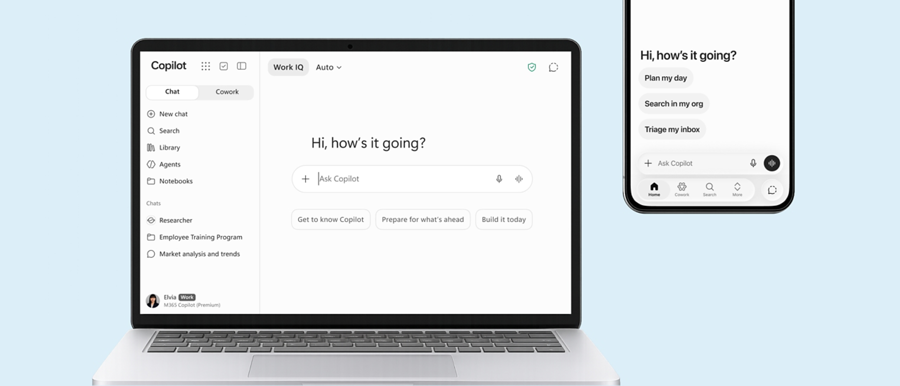
Copilot brings AI assistance into Word, Excel, Outlook and Teams, drawing on the documents and messages each person already has access to. That makes it only as safe as your permissions: if staff can open files they should not, Copilot can surface them.
What it solves
How Subnet works with it
We start with a readiness assessment covering permissions, sharing and data classification, fix what it finds, then pilot Copilot with a small group before wider rollout. See AI and data security readiness for the full approach.
Licensing
Microsoft licensing changes often, and the difference between plans such as Business Premium and E3 decides which security and management features you actually have. Subscriptions run on annual or monthly terms with fixed anniversary dates.
What it solves
How Subnet works with it
As a Microsoft Cloud Solution Provider, we supply licences directly, review the mix before each anniversary and align it with what your staff use. Licensing is the most frequent Microsoft work we do.
WORK WITH SUBNET
1. Assess
We review tenancy, licensing, security settings and what is still on premises.
2. Plan
A staged roadmap with fixed-price projects, so each step is useful by itself.
3. Migrate
Mail, files, devices and servers move in stages, with staff told what changes and when.
4. Manage
Under Managed Services, we look after the tenancy, devices, security settings and user changes.
5. Review
Licences are reviewed before each anniversary, and the roadmap updated as Microsoft’s products change.
WORK WE HAVE COMPLETED
Professional services
A full Azure migration, followed by a move to Azure Virtual Desktop with Intune device management.
Retail and distribution
Migration from a third-party hosting provider into Azure, with file shares moved to Azure Files.
Education
Domain controllers moved to Microsoft Entra ID, Intune for classroom and lab devices, SharePoint modernisation and Copilot for staff.
Construction
FortiGate firewalls in Azure with professional services, and Microsoft 365 licensing across offices.
Health and not-for-profit
Microsoft 365 migrations, SharePoint builds, Intune rollouts and Copilot readiness assessments.
Environmental services and food production
Large Microsoft 365 E3 licensing agreements managed through annual renewals.
YOUR QUESTIONS
Subnet is. We are based in Forestville, Adelaide, and have been a Microsoft partner since 2001. We supply Microsoft 365 and Azure licences directly as a Cloud Solution Provider, and deliver the work around them: migrations, Intune device management, SharePoint and Teams, Microsoft security and Azure infrastructure. That includes more than 55 SharePoint projects and more than 45 Azure projects for South Australian organisations.
It depends mostly on your permissions. Copilot can draw on anything a person already has access to, so files shared too widely in SharePoint, Teams and OneDrive can surface in its answers. Being ready means the right licences are in place, sharing and permissions have been reviewed, and sensitive information is labelled. Subnet runs a readiness assessment first, fixes what it finds and then pilots Copilot with a small group.
They cover different things. A subscription gives you the right to use Microsoft services under the plan you hold. An implementation project changes your environment: it defines the proposed changes, prerequisites, user impact and acceptance checks. An ongoing support agreement covers who runs things afterwards. Subnet agrees who owns administration, support and security operations after handover, so none of these is assumed to include the others.
Subnet helps with Microsoft licensing alongside deployment, configuration, security, governance and support. In practice that starts with what you need to do, such as move email, organise shared files, manage devices or strengthen security, and then which licences and prerequisites that requires. Who purchases and holds the licences, and what is included, is agreed for your environment before work starts.
No. Desktop application rights, Teams availability and additional services depend on the subscription selected. By Microsoft’s published plan comparison (fetch summary, not verbatim), Business Basic plans are web and mobile only, while Business Standard and Business Premium include desktop apps, and Teams is included only in versions that list it. Plans change, so confirm the current comparison and match the plan to how your people work before buying.
Confirm licensing and supported platforms first. Microsoft describes Intune as licensed through Plan 1, Plan 2 and the Intune Suite, with the latter two adding to Plan 1, and most organisations receive Intune inside a Microsoft 365 bundle (fetch summary, not verbatim). Some capabilities depend on other licences, such as Microsoft Entra ID P1 or P2. An Intune project does not automatically include every add-on or replace all existing device-management responsibilities, so enrolment, configuration, deployment and handover are agreed before delivery.
An assessment looks at the agreed directory environment, where years of changes to accounts, groups, permissions and configuration may have created uncertainty, operational issues or unnecessary access. It produces findings that can become a prioritised remediation plan. The assessment itself is a review. Any later changes should take account of application dependencies, service accounts and recovery arrangements, with approval and verification built in. Scope and any remediation are agreed for your environment.
No. Microsoft describes Active Directory Domain Services as the on-premises identity system and Microsoft Entra ID as a cloud-based identity platform; Entra ID can sync identities from AD DS (fetch summary, not verbatim). They serve different purposes, so a review of one does not cover the other. Existing Active Directory dependencies should be resolved before identity or endpoint changes begin, and the scope is agreed for your environment.
Subnet can work as the primary provider or in a co-managed model with an internal IT team. For Microsoft work, the useful step is to agree who administers what: licensing, implementation, day-to-day administration, support and security operations. That division is documented for your environment, so responsibilities are clear after handover.
Existing customers who need help should use the Support link on this website rather than the sales enquiry form, which is for new requirements. Support arrangements, scope and any response expectations depend on your agreement with Subnet. If you are unsure whether an issue falls under your current arrangement, ask your usual Subnet contact.
LET’S TALK
Tell us about your organisation and what you need. Start a conversation, discuss a project or request a meeting.


