Skip to content

Technology

NinjaOne

Subnet uses NinjaOne to monitor, patch and support the computers and servers of South Australian organisations, wherever their people are working.

NinjaOne logo

Endpoint management

monitoring, patching and remote support in one platform

Windows, macOS and Linux

managed from one cloud console

Run by Subnet

so issues are found and fixed before they interrupt work

WHAT NINJAONE OFFERS

Every device visible, patched and supportable

NinjaOne is a cloud-based IT management platform. These are the parts of the range Subnet works with most.

Visibility

Endpoint monitoring and management

NinjaOne monitors Windows, macOS and Linux devices from a cloud console, showing health, performance, installed software and outstanding maintenance for every computer and server.

What it solves

  • Not knowing what devices you have or what state they are in
  • Problems found only when a staff member reports them
  • Devices that rarely visit the office

How Subnet works with it

We install the agent on every managed device, set alert thresholds that matter and automate the routine fixes.

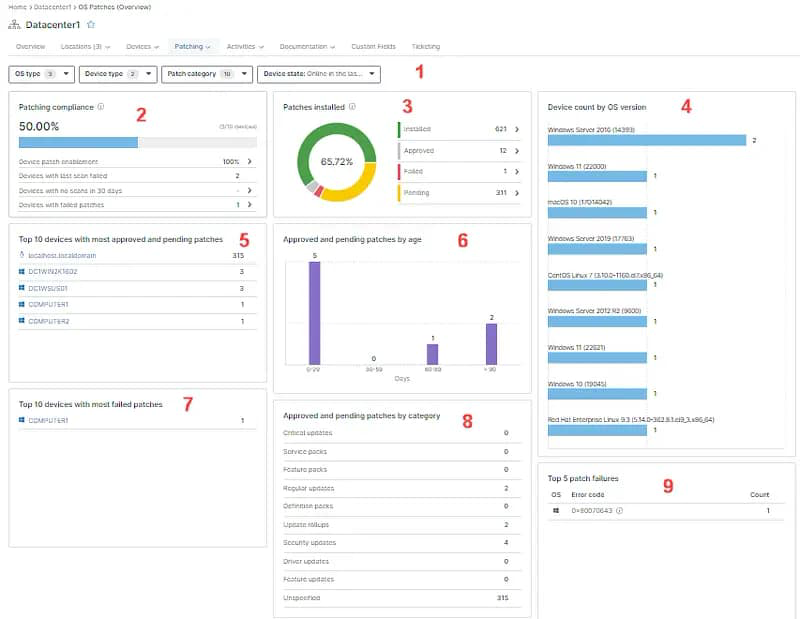
NinjaOne patch management compliance dashboard

Patching

Patch management

NinjaOne scans each device for missing operating system and third-party application patches and deploys them on a schedule.

What it solves

  • Security updates applied late or not at all
  • Third-party software such as browsers and PDF readers left unpatched
  • No proof of patch status for audits and the Essential Eight

How Subnet works with it

We agree patching windows and approval rules with you, test before broad release and report compliance each month.

Support

Remote access and support

NinjaOne gives technicians secure remote access to run commands and scripts, transfer files and troubleshoot a device without a site visit.

What it solves

  • Waiting for someone to come on site
  • Staff working from home or interstate
  • Repeating the same fix by hand on many machines

How Subnet works with it

Our service desk uses it to resolve most issues remotely, with the staff member’s consent for attended sessions and a record of every connection.

WORK WITH SUBNET

How Subnet works with NinjaOne

1. Assess

We audit the devices you have and how they are managed today.

2. Design

Monitoring, patching and automation policies are agreed for each group of devices.

3. Deploy

Agents are deployed remotely, usually without interrupting staff.

4. Operate

Devices are monitored and patched continuously. NinjaOne is one of the technologies behind Subnet’s managed services.

5. Review

Monthly reporting shows device health, patch compliance and recurring issues.

Working with Subnet

Connect tooling with operational ownership

Subnet can scope endpoint management around the devices, applications and users being supported. The discussion should cover onboarding, monitoring, patch approval, maintenance windows, restart arrangements and how failed or deferred updates are handled.

Remote administration also needs clear access controls and responsibilities. In a co-managed arrangement, Subnet and the internal team should agree who can act, who is notified and who owns follow-up work.

Working with Subnet

Where it fits in Subnet's services

NinjaOne is among the technologies Subnet actively works with. Its primary relevance here is Foundations and co-managed IT operations where endpoint management forms part of the agreed service.

Specific licences, functions, device coverage and service levels must be confirmed. Backup, mobile-device management, ticketing and other products in the wider NinjaOne portfolio should not be assumed to be included simply because endpoint management is in use.

Plan your next step

Useful starting points

Understand which devices are managed and which are missing from the current view.

Review patching responsibilities and maintenance windows.

Improve the handover between internal IT and an external support team.

Identify recurring endpoint work that could be handled consistently.

YOUR QUESTIONS

A LITTLE MORE CLARITY.

Who provides managed patching and endpoint management in Adelaide?

Subnet does. We are based in Forestville, Adelaide, and use NinjaOne to monitor, patch and support computers and servers for South Australian organisations. We agree patching windows with you, deploy updates for Windows and common third-party software, and report compliance each month.

Does this replace all our other IT tools?

Not necessarily. The appropriate combination depends on your environment and requirements. Subnet can help clarify where endpoint management fits alongside identity, device enrolment and security tools.

Can every issue be fixed remotely?

No. Remote tools support many administrative and troubleshooting tasks, but some issues still require other access, a hardware intervention or a separately scoped service.

Does every device need an agent installed?

NinjaOne uses an agent installed on each device it manages. According to NinjaOne, the agent enrols the device into the console and communicates over the internet, without needing a domain join or VPN. Which devices are in scope, and how they are onboarded, is agreed as part of the service scope.

Which operating systems and devices can it manage?

NinjaOne supports Windows, macOS and Linux endpoints, but depth differs by platform. NinjaOne describes Windows as having the broadest support, including patching, scripting, software deployment and remote access, with macOS and Linux covered mainly by monitoring, scripting and automation. Device coverage in Subnet's service needs to be confirmed against your environment.

How does patching work, and who decides what is installed?

NinjaOne applies patches through policies. Individual patches can be approved, rejected or left pending, and a policy can also auto-approve patches after a set delay. Patch approval is part of the agreed service scope, so it is worth agreeing up front who approves updates, which devices follow which policy, and what needs sign-off from your team.

Can patching and restarts be kept away from working hours?

Often, yes. NinjaOne policies can tie restarts to maintenance windows or off-hours and stagger them across groups of devices. Signed-in users can be prompted and allowed to postpone within limits that IT sets, and the policy can escalate to a forced restart. Maintenance windows and restart arrangements are agreed as part of the service.

What happens if an update fails or a device is offline?

NinjaOne can raise an alert when a patch fails, and a restart that is pending for an offline device is picked up when it reconnects. What Subnet does next, and who is told, is part of how failed or deferred updates are handled, which is agreed when scoping the service rather than assumed.

Does it patch third-party applications as well as the operating system?

NinjaOne offers third-party application patching for Windows endpoints, with applications selected from a software library and approval settings for critical and recommended updates. NinjaOne notes limits, including that some applications have reduced support and that Windows is the only platform covered. Which applications are in scope should be confirmed rather than assumed.

How is remote access controlled and recorded?

NinjaOne includes built-in remote tools such as unattended access and file transfer, and its documentation describes role-based access control and session logging. Remote administration needs clear access controls and responsibilities, so who can connect, who is notified and who follows up is agreed between Subnet and your team, particularly in a co-managed arrangement.

BEFORE WE TALK

A useful starting point.

You do not need a finished technical brief. Start with the outcome, what you know today and the questions you need answered.

  • What capability are you looking for?
  • How would it work with your current environment?
  • Who will own licensing, implementation and ongoing operation?
Discuss these priorities

LET’S TALK

WHAT WOULD YOU LIKE TO DO NEXT?

Tell us about your organisation and what you need. Start a conversation, discuss a project or request a meeting.

Prefer to talk?(08) 7127 9400Already a customer and need help? Go to Support.
PROPOSED FORM · PRIVATE PREVIEW ONLY

Preview only. Nothing is sent, stored or booked.

A live version will need final routing, consent and privacy review. Subnet privacy policy

Contact us