Who provides managed patching and endpoint management in Adelaide?
Subnet does. We are based in Forestville, Adelaide, and use NinjaOne to monitor, patch and support computers and servers for South Australian organisations. We agree patching windows with you, deploy updates for Windows and common third-party software, and report compliance each month.
Does this replace all our other IT tools?
Not necessarily. The appropriate combination depends on your environment and requirements. Subnet can help clarify where endpoint management fits alongside identity, device enrolment and security tools.
Can every issue be fixed remotely?
No. Remote tools support many administrative and troubleshooting tasks, but some issues still require other access, a hardware intervention or a separately scoped service.
Does every device need an agent installed?
NinjaOne uses an agent installed on each device it manages. According to NinjaOne, the agent enrols the device into the console and communicates over the internet, without needing a domain join or VPN. Which devices are in scope, and how they are onboarded, is agreed as part of the service scope.
Which operating systems and devices can it manage?
NinjaOne supports Windows, macOS and Linux endpoints, but depth differs by platform. NinjaOne describes Windows as having the broadest support, including patching, scripting, software deployment and remote access, with macOS and Linux covered mainly by monitoring, scripting and automation. Device coverage in Subnet's service needs to be confirmed against your environment.
How does patching work, and who decides what is installed?
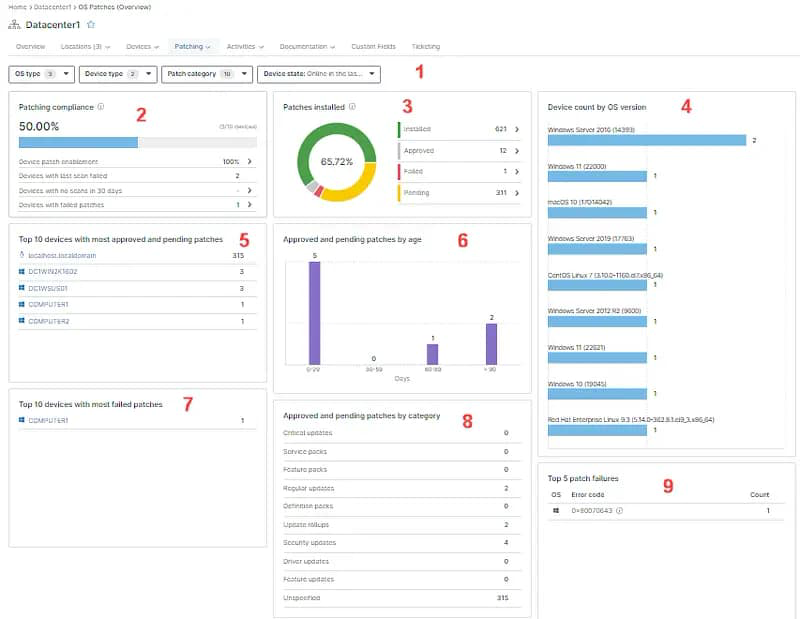
NinjaOne applies patches through policies. Individual patches can be approved, rejected or left pending, and a policy can also auto-approve patches after a set delay. Patch approval is part of the agreed service scope, so it is worth agreeing up front who approves updates, which devices follow which policy, and what needs sign-off from your team.
Can patching and restarts be kept away from working hours?
Often, yes. NinjaOne policies can tie restarts to maintenance windows or off-hours and stagger them across groups of devices. Signed-in users can be prompted and allowed to postpone within limits that IT sets, and the policy can escalate to a forced restart. Maintenance windows and restart arrangements are agreed as part of the service.
What happens if an update fails or a device is offline?
NinjaOne can raise an alert when a patch fails, and a restart that is pending for an offline device is picked up when it reconnects. What Subnet does next, and who is told, is part of how failed or deferred updates are handled, which is agreed when scoping the service rather than assumed.
Does it patch third-party applications as well as the operating system?
NinjaOne offers third-party application patching for Windows endpoints, with applications selected from a software library and approval settings for critical and recommended updates. NinjaOne notes limits, including that some applications have reduced support and that Windows is the only platform covered. Which applications are in scope should be confirmed rather than assumed.
How is remote access controlled and recorded?
NinjaOne includes built-in remote tools such as unattended access and file transfer, and its documentation describes role-based access control and session logging. Remote administration needs clear access controls and responsibilities, so who can connect, who is notified and who follows up is agreed between Subnet and your team, particularly in a co-managed arrangement.