Skip to content

Technology

HP

Subnet supplies, sets up and supports HP laptops, desktops and workstations for South Australian organisations, from a handful of replacements to a whole-of-school device program.

HP logo

Since 2015

an HP partner from the year HP Inc. was formed

270+

HP orders and device projects completed

Fleets across Australia

delivered to Adelaide, Sydney, Melbourne, Queensland and Western Australian sites

WHAT HP OFFERS

Business devices, chosen for the job and ready to use

HP makes the laptops, desktops, workstations and thin clients most of our customers work on every day. These are the parts of the range Subnet works with most.

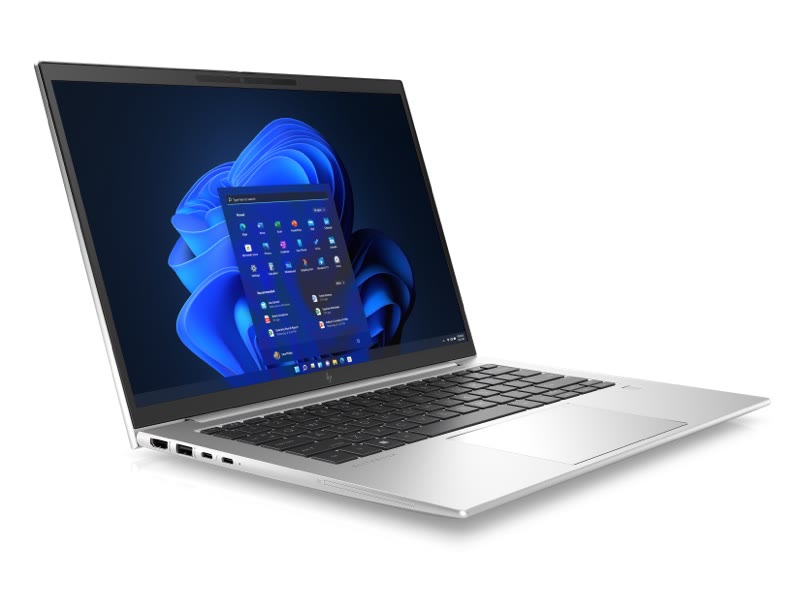
HP EliteBook 840 5G laptop in silver

Laptops

HP EliteBook and ProBook

EliteBook is HP’s premium business laptop range and ProBook its mainstream one. Both run Windows 11 Pro, come in 13, 14 and 16 inch sizes and include HP Wolf Security. Current models add on-device AI processing for Copilot features.

What it solves

  • A mixed fleet of ageing laptops that are slow and out of warranty
  • Staff who move between office, home and site
  • Choosing a standard model instead of buying ad hoc

How Subnet works with it

We agree one or two standard models for your roles, register special bid pricing with HP for larger orders, and deliver devices already enrolled and configured so staff sign in and start working.

Workstations

HP ZBook mobile workstations

ZBook is HP’s workstation range for design, engineering and modelling software that needs certified graphics and more memory than a standard laptop.

What it solves

  • CAD, BIM and rendering software struggling on office laptops
  • Engineers and estimators who need full power on site
  • Software vendors requiring certified hardware

How Subnet works with it

We match the specification to the software your team runs and its vendor requirements, so you are not over- or under-buying.

Desktops and shared spaces

Desktops, all-in-ones and thin clients

For front counters, classrooms, labs and shared desks, HP’s desktops and all-in-ones are simpler to secure and maintain than laptops. Thin clients suit sites where applications run centrally and the device on the desk only needs to connect.

What it solves

  • Shared computers that many people log on to
  • Retail and branch sites with no on-site IT
  • Classroom and lab fit-outs

How Subnet works with it

We have rolled out thin clients to branch networks across several states in one program, shipping devices pre-configured to each site.

Security

HP Wolf Security

HP Wolf Security is the hardware-level protection built into HP business devices, working below the operating system as well as within it. It complements the endpoint security and device management you already run.

What it solves

  • Devices that leave the building every day
  • Firmware and hardware attacks that software alone cannot see
  • Meeting security baselines for insurance or audit

How Subnet works with it

We set devices up so HP’s protections work alongside Microsoft Intune and your endpoint security, with one policy and no overlap.

Warranty and lifecycle

Care Packs, finance and refresh

HP Care Packs extend warranty to three or five years with on-site repair. Combined with a planned refresh cycle, they keep a fleet in support for its whole working life.

What it solves

  • Devices failing after the standard warranty ends
  • Unpredictable spend on replacements
  • No record of what is deployed or how old it is

How Subnet works with it

We quote the device, warranty and set-up as one price per user, track warranty end dates and plan the refresh in stages. Finance and device-as-a-service options are available where spreading the cost helps.

WORK WITH SUBNET

How Subnet works with HP

1. Assess

We review the current fleet by age, warranty and role, and what each group of staff actually needs.

2. Standardise

One or two models per role, with HP special pricing registered for larger orders.

3. Deploy

Devices arrive enrolled and configured, with data moved and old devices wiped and recycled.

4. Support

Our service desk handles faults and logs warranty repairs with HP on your behalf.

5. Refresh

We track warranty and age and plan replacements in stages so the fleet never falls out of support.

WORK WE HAVE COMPLETED

HP projects by sector

Education

Whole-of-school student and staff device programs under HP special bid pricing, and laptop fleets for colleges.

Construction

A fleet refresh delivered to Adelaide, Sydney and Melbourne offices at once, and ZBook workstations for design and estimating teams.

Manufacturing

EliteBook fleets and end-user device programs for a rail manufacturer.

Retail and services

Thin clients rolled out to branches in South Australia, Queensland and Western Australia.

Health

Standardised HP Elite devices for a health provider.

Government and not-for-profit

Laptop and desktop refreshes, including mobile-connected devices for field staff.

Explore HP

Business devices

Choose HP business laptops and desktops around the applications, work locations and lifecycle needs of your people. Device configuration, accessories and management should fit together.

Explore business-device selection

Z desktop and mobile workstations

Match HP Z desktop and ZBook mobile workstations to demanding applications, graphics workloads, project sizes and mobility requirements.

Explore workstation requirements

Poly personal collaboration

Connect headset and camera selection with the way people join calls and meetings. Compare comfort, connection, noise management, lighting and platform requirements.

Explore Poly audio and video

Selection, rollout and support

Subnet connects product selection with applications, device management, rollout and support responsibilities. Features and compatibility vary by model, configuration, licence and the environment in which the device is used.

Questions about HP devices, warranty and support

Who supplies and sets up HP business laptops in Adelaide?

Subnet does. We are based in Forestville, Adelaide, and have been an HP partner since 2015, with more than 270 HP orders and device projects completed for South Australian schools, builders, manufacturers and health providers. We help choose the model, register special pricing with HP for larger orders, and deliver devices enrolled and configured so staff can sign in and start work.

How often should business laptops be replaced?

Most organisations plan to replace laptops every three to five years, in line with the warranty they bought. After that, batteries fade, repairs are no longer covered and older hardware may not run current Windows releases or security features. Replacing a portion of the fleet each year spreads the cost and avoids a single large purchase. Subnet tracks device age and warranty so the plan is based on your actual fleet.

How do we choose between a standard HP business laptop and a ZBook mobile workstation?

Start with the applications and the work they involve. HP describes its ZBook mobile workstations as having professional graphics, software-vendor certification for selected applications and cooling designed for sustained workloads, with options such as ECC memory on some configurations. Those features suit demanding graphics or analysis work, while a standard business laptop may be enough for office applications. The exact model and configuration matter more than the product family, so list the applications, typical file sizes and how often people work away from a desk.

What does software-vendor certification mean for a Z workstation?

HP says software-vendor (ISV) certification is meant to confirm that the workstation hardware is compatible with the application it will run. It is not a blanket assurance. HP notes that some software vendors do not test every hardware combination and publish minimum configuration requirements instead. Check the application, its version and the exact workstation configuration, using HP’s certification search and the software vendor’s own requirements.

What should we gather before sizing a workstation?

Name the applications and versions, the largest projects or datasets people handle, whether the work depends on a graphics processor, and whether staff need a desktop Z workstation or a mobile ZBook. Include monitors, docks and storage needs where they affect the build. These details let processor, graphics, memory and storage be matched to the work rather than to a catalogue tier. Testing the choice with one or two representative users before a wider order is a sensible check.

What does the standard HP warranty cover, and what does a Care Pack add?

A standard manufacturer’s warranty covers faults in materials and workmanship for a set period. HP’s Australian Care Pack overview lists one year for laptops and desktops, generally return-to-depot rather than onsite. A Care Pack extends and enhances that cover, for example with onsite repair, and HP lists terms of up to five years for business laptops and desktops. Service levels and response times vary by location, HP’s terms at the time of purchase apply, and customers may also have statutory rights under local law.

Do we need accidental damage cover, and when must we choose it?

HP describes accidental damage protection (ADP) as an optional addition for business laptops and desktops, and says the standard warranty does not cover accidental damage. Timing matters: HP says an in-warranty Care Pack is bought with the device or within 90 days of the device’s purchase date, and service starts from the hardware purchase date. Decide at quotation stage how likely drops, spills and travel are for each group of users, and whether options such as defective media retention are worth adding.

Can HP devices arrive already set up for our environment?

HP offers factory configuration services that can include custom images and applications, asset tagging and BIOS personalisation, along with delivery options to a dock or door. HP prices these per unit or per order, they apply to HP hardware, and HP’s terms at purchase govern them. Who performs the setup (HP’s factory service, Subnet or your own team) is agreed in the rollout scope. Confirm what each option includes so that setup steps are not duplicated.

What tools does HP provide for managing BIOS settings and drivers across many devices?

HP publishes client management tools, including driver packs, the Client Management Script Library (free PowerShell scripts for BIOS settings and for driver and software updates), HP Image Assistant for checking and installing drivers and BIOS updates, and a Manageability Integration Kit for Microsoft Configuration Manager. HP states that support covers most, not all, of its commercial models, and some tools depend on other products. Which tools suit your fleet depends on the models and your management platform, so confirm that in the device-management design.

How do we choose Poly headsets and cameras for each person?

Match the device to how the person joins calls, such as at a desk, in an open-plan area, at home or on the move. Compare comfort, connection, noise management, lighting and the meeting platform in use. HP lists a Poly range certified for Microsoft Teams, but support varies by product, and some Poly desk phones connect to Teams through a gateway rather than natively. Check the specific model against your platform before ordering in volume.

BEFORE WE TALK

A useful starting point.

You do not need a finished technical brief. Start with the outcome, what you know today and the questions you need answered.

  • What capability are you looking for?
  • How would it work with your current environment?
  • Who will own licensing, implementation and ongoing operation?
Discuss these priorities

LET’S TALK

WHAT WOULD YOU LIKE TO DO NEXT?

Tell us about your organisation and what you need. Start a conversation, discuss a project or request a meeting.

Prefer to talk?(08) 7127 9400Already a customer and need help? Go to Support.
PROPOSED FORM · PRIVATE PREVIEW ONLY

Preview only. Nothing is sent, stored or booked.

A live version will need final routing, consent and privacy review. Subnet privacy policy

Contact us