Who can review and harden Microsoft 365 security in Adelaide?
Subnet does. We are based in Forestville, Adelaide, and have been a Microsoft partner since 2001. We review your tenant against Microsoft and ASD guidance, confirm what your licences already include, apply the changes in stages with a pilot group, and monitor the tenant so settings do not drift.
What does a Microsoft 365 security review look at first?
Work starts by understanding your environment, existing licences and business priorities. The usual path is then to review the controls and agree the changes, exceptions and owners; pilot and implement the selected work, with change approval where needed; and validate the results and hand over. Findings should become implementation decisions with owners and testing, with the handover agreed in scope, not an unchecked list of settings. The users, devices and workloads covered should be agreed in scope.
Does a good Microsoft Secure Score mean we are secure?
No. Secure Score is a useful way to report on and improve your security posture, but it is not a certification. Microsoft says the score is not an absolute measure of how likely a breach is, and that it should not be read as a guarantee against one. Treat it as a progress indicator alongside a view of your business risk.
Will tighter sign-in and access rules disrupt our staff?
They can if they are switched on without testing. Low-impact changes should be separated from those that affect sign-in, access or user workflows. Higher-impact changes need a rollout plan, agreed exceptions and a recovery approach, and should be piloted with representative users and devices, including administrators and business-critical applications. Microsoft Entra Conditional Access also offers a report-only mode, which evaluates a policy and logs the result without enforcing it, so it can be tested before it is enabled.
How do Entra and Intune relate to our existing Active Directory?
Microsoft says organisations with an existing Windows Server Active Directory use Microsoft Entra Connect to sync identities to the cloud. Microsoft Intune can report whether a device is compliant, and Conditional Access can require a compliant device before granting access. Subnet treats an Active Directory assessment as distinct from cloud Entra configuration, so confirm which of the two is in scope for your work.
Do we need Defender for Business or Defender for Endpoint?
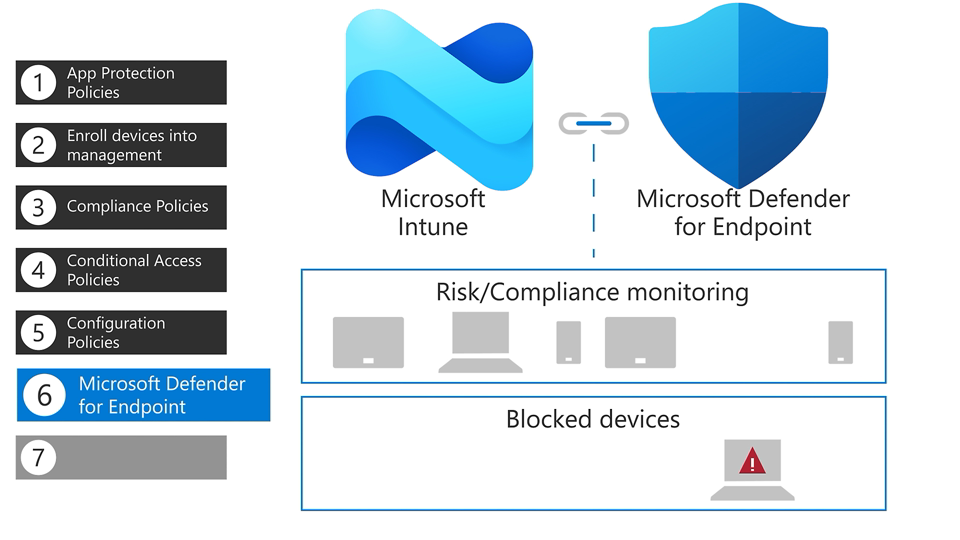
It depends on your organisation size, operating requirements and existing entitlements. Microsoft says Defender for Business is designed for small and medium-sized businesses with up to 300 users. It includes the features of Defender for Endpoint Plan 1, some features from Plan 2, and some unique features for small and medium-sized businesses. Microsoft also says protection for Windows and Linux servers needs extra licences, for example the Defender for Business servers add-on. Deployment work should establish which devices are covered, whether existing security tools conflict, how protection is validated and who responds to alerts. Server coverage and ongoing managed detection and response should be explicitly agreed in scope.
What does our Microsoft 365 licence already include for security?
Checking existing entitlements is part of understanding the environment first. As an example from Microsoft’s documentation, Microsoft 365 Business Premium, which Microsoft positions for small and medium-sized businesses of up to 300 users, includes Microsoft Entra ID P1, Microsoft Intune Plan 1, Microsoft Defender for Business, Microsoft Defender for Office 365 Plan 1, and Microsoft Purview Information Protection and data loss prevention. Microsoft also offers a separate add-on, Microsoft Defender Suite for Business Premium, whose components are Microsoft Entra ID P2, Defender for Identity, Defender for Endpoint Plan 2, Defender for Office 365 Plan 2 and Defender for Cloud Apps. Licences, prerequisites and service responsibilities are agreed for your environment.
How do sensitivity labels, DLP and retention differ in Microsoft Purview?
Sensitivity labels classify content and can enforce protection such as encryption and content markings. Data loss prevention policies identify and monitor sensitive items and can block inappropriate sharing, for example by email, across locations such as Exchange and SharePoint. Retention policies and labels retain content, delete it, or both, for a specified period. Each control needs a policy purpose, an owner and testing, and a security uplift should not be assumed to include Purview implementation, so confirm governance requirements, licensing and delivery scope separately.
Should we fix our permissions and data handling before turning on Copilot?
It is worth reviewing first. Microsoft says Copilot only surfaces organisational data that a user has at least view permissions to, so overly broad permissions on content in places such as SharePoint or Teams are worth reviewing before Copilot is turned on. Subnet’s AI, Copilot and data security readiness assessment reviews data security, identity, permissions, information protection, governance and Microsoft 365 readiness. Related Microsoft 365 project work can be discussed separately. Whether a readiness review fits your situation should be agreed in scope.
What do we receive at the end of Microsoft security work?
The path described ends with validating the results and handing over the configuration, outstanding actions and operational responsibilities, so it is clear who looks after each control afterwards. The format and contents of the handover should be agreed in scope. Server coverage, ongoing managed detection and response and any Purview implementation are not assumed and must be agreed explicitly. Capabilities, licences and prerequisites are agreed for your environment.